Posted on July 01, 2019

Undelete

Canvas currently provides a feature that allows instructors to “undelete” course content that has been recently deleted.

To restore deleted content follow these steps:

  1. Navigate to the course in which you need to restore deleted content
  2. In the address (URL) box of your browser, note that the address of your course is https://uncg.instructure.com/courses/(your course number) with the “your course number” being an actual number.
  3. Following the course number in the address, add a forward slash followed by the word “undelete.” Your address should then look something like https://uncg.instructure.com/courses/12345/undelete
  4. When navigating to this URL you will be presented with all course material that has been deleted. Simply restore deleted content by pressing the “restore” button next to deleted content you wish to restore.
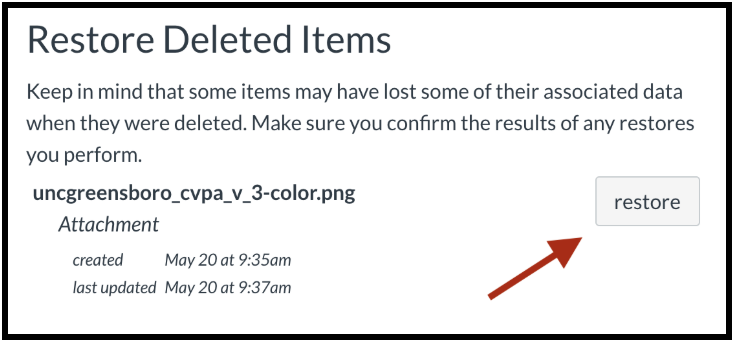
    Canvas screen shot

More News

  • Bassoon Professor Partners with High School to Expand Access
    A December collaboration between Dr. Ryan Reynolds, Assistant Professor of Bassoon and Chamber Music at UNCG, and the C.E. Jordan High School Bands in Durham, N.C., transformed a winter concert... Continue reading...
  • Never Stop Dreaming: Forward-Thinking Saxophonist Thrives on Jazz Culture
    Saxophonist Franco Romero is charting a remarkable musical journey at UNCG. After beginning his training in Cuba’s conservatory system, a pivotal mentorship at UNCG helped him refine his artistic path. Today, supported by scholarships from the Latin GRAMMY Cultural Foundation, Romero continues to grow as a forward‑thinking artist in the UNCG Jazz Studies program—embracing new opportunities, deepening his craft, and living out his dream in jazz.